With a spacious, modern clinic in Cardiff,
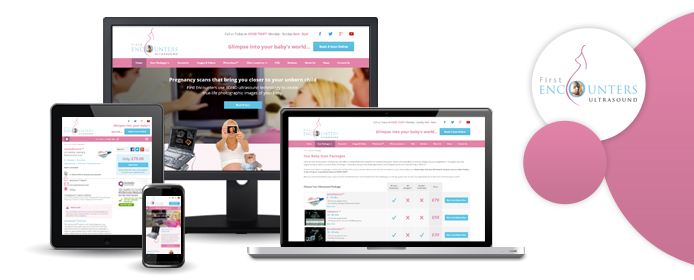
First Encounters Ultrasound are among the UK's top providers of 4D ultrasound scans. Their sonographers use state-of-the-art imaging equipment to capture in utero footage of unparalleled quality, but until this week, the company's website did not reflect this commitment to the latest, highest-quality technologies. The site looked outdated and was difficult to navigate, particularly on smartphones and other devices with relatively small screens.
Clearly, it was time for an upgrade, and so we at Designer Websites were asked to improve and modernise the First Encounters website to give the company's clients a better online experience. To this end, we created a functional, responsive design that looks just as good (and works just as well) on mobile phones as it does on PCs; we also implemented a robust online booking system that allows expectant parents to select a scan package and make an appointment without even picking up the phone.
The new First Encounters website looks fantastic, and we feel that it is a great representation of this cutting-edge company and the services they offer. If you would like to take a closer look at your unborn baby, visit
www.firstencounters.co.uk today!
PPC simply stands for Pay Per Click, a form of internet marketing that you only pay for when one of your ads is clicked. It's a great way of attracting potential customers or service users to your website instead of waiting to be found amongst the millions of organic search engine results.
There are many different types of PPC around these days. It is most commonly seen on large search engines such as Google, Bing, and Yahoo; however, it has more recently spread to social media platforms like Facebook and Twitter. While social media PPC takes a different format, the fundamentals are the same: you only pay for the ad when somebody clicks on it.
For the purpose of this blog post, we're going to look at the basics of search engine PPC. Search engine pay-per-click advertising essentially allows you to bid for your ads to appear at the top of Google's results page so that, when someone types in a search query that is relevant to your service or products, your ads will be triggered.
For example, if you need to buy a sash for your friend's hen night, you might head to google.co.uk and enter the phrase hen night sash.
After entering the search query, you will be taken to the search results page, and this is where you will find adverts and organic listings for companies who are trying to solve your problem. As you can see from above, the first three listings (framed in red) are adverts, with Google Shopping results on the top right and more adverts underneath them.
Note: The results framed in green are Google's organic listings - this is where our SEO team will help you to appear!
At this point, you spot an advert from a company (
Henstuff) selling
Hen Night Sashes from £0.75. When you click on this advert, you will be taken to that company's website, and they will have to pay a small charge to Google.
A lot goes into building a successful AdWords campaign. First, you must research the keywords that are most relevant to your business; then, you must select the right keywords for your campaign (ideally, you want to target cheap keywords that will attract lots of customers to the right stage of the buying process). After that, you must organise these keywords into relevant ad groups and create landing pages on your website that are properly optimised to drive conversions. If done properly, all of this work won't go unrewarded - a carefully-targeted campaign will see you pay less every time your adverts are clicked, meaning higher profits for your company.
Would you like to try pay-per-click advertising for your company? Here at Designer Websites, we have a team of PPC experts who will help you to get the best possible results from Google AdWords and other platforms. Get in touch today!
My Garment Factory Cardiff is a personalised clothing website targeted - as the name suggests - specifically at Cardiff and the surrounding area. The site was set up with the aim of cornering the custom clothing market in South Wales, and the MGF team are certainly doing well on this front; they already occupy some of the top Google results for terms like
printed clothing Cardiff and
embroidered clothing Cardiff.
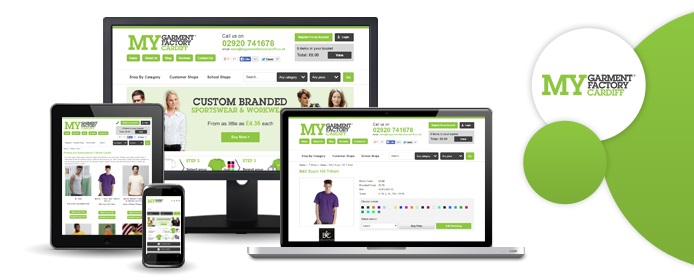
With traffic pouring in and their website now established as a major competitor within its target market, MGF started thinking about how they might improve the service they offer. Wishing to maximise their website's conversion rate, they contacted us to ask if we could help them to make the site more mobile-friendly; they were receiving plenty of visits from smartphones and other mobile devices, and they wanted to ensure that they weren't letting this potentially valuable traffic go to waste.
So we set about creating a responsive design for My Garment Factory Cardiff, and we're pleased to announce that the new version of the website is now live. Being responsive means that the new design adapts to your screen size; for example, if you visit
www.mygarmentfactory.co.uk on a mobile phone browser, what you see will be slightly different to what a PC user would see on the same page. This allows us to optimise the website for different devices, making the personalisation process equally easy on desktop computers, smartphones, tablets, laptops, and all other devices!
Last month, Google issued an ultimatum to webmasters the world over: make your websites mobile-friendly before April 21, 2015, or we'll stop showing you in our mobile search results. You can read the official announcement on Google's blog; search experts have nicknamed the promised algorithm change "the mobile SEO-pocalypse", and with that mid-April deadline now less than a month away, innumerable business owners are scrambling to make their sites look good on smaller screens so as to avoid losing their Google traffic.
Now, we're not here today to give you responsive design hints - the internet is already packed with articles explaining how to make your website 'mobile-friendly', and if you want our help, you can request a quotation here. However, we have noticed one potential issue that few others seem to pick up on, and it concerns your website's text.
You see, when web designers create a new design for an old website, they will often just copy and paste the old site's copy into the new design. This approach can create some problems for the end user, even if the information within the text is up-to-date. Here's a fictional example:
- Alice is an interior designer who owns her own business. She has a brochure website - let's call it aliceinteriors.com - that she uses to drive enquiries. Would-be customers fill in a contact form on the website, and Alice calls them up to discuss their requirements, quote prices, and so forth.
- Alice has heard about Google's upcoming algorithm change, and she wants to make her website mobile-friendly before April 21 to make sure she doesn't lose any business. She hires a local web design company to create a new responsive design and optimise the site for mobile users.
- A responsive website is effectively several different website designs in one, and aliceinteriors.com will now look different depending on whether Alice views it on a PC or on a smartphone. For instance, the site menu will likely be represented by the ubiquitous hamburger icon on smaller screens, and certain elements of each page may appear in different positions across different devices.
- While looking at the mobile version of her website, Alice notices an issue: the text on her homepage tells users to "Fill in the form on the right", but in the mobile view, Alice's all-important enquiry form is placed directly below the text in question.
This imagined scenario is just one example. Broadly speaking, any written reference to site layout ("Click on the link below", "Select an option from the menu above", etc.) becomes problematic - if not outright misleading - when placed within a responsive design. Unless you and your web designer can find a way to ensure that certain items remain static across all views, it may be better to remove any such phrases entirely and find other ways to draw attention to your website's key elements.
Either way, there's an important lesson to be learned here: when optimising your website for mobile users, be sure to read through your site's text in each different view to make sure that you aren't confusing people with smartphones!
Safety-Lifting.com is a brand new ecommerce website with a wide range of products on offer, including safety equipment, material handling gear, and heavy-duty lifting equipment. The site, which went live earlier this week, is specifically targeted at trade customers (e.g. agents and distributors who will re-sell the goods to their own customers), and so it does differ from the average ecommerce site in several key ways:
- Site users must register for a trade account before placing any orders; the checkout page cannot be accessed unless you are logged in
- Safety Lifting's trade prices are only shown to registered trade users
- The website's design and copy were created with professional traders - rather than retail consumers - in mind
Of course, in spite of these differences, the Safety Lifting site still needed to be as functional and as user-friendly as any other website. Mobile users will notice that the site has a responsive design, allowing it to adapt to any screen size without sacrificing the usability; furthermore, we have made the account signup process as streamlined and as straightforward as possible, making it easy for a busy trader to create their account and complete their purchase without any trouble.
Click here to visit the Safety Lifting website and see our latest work.